Schema and data side by side
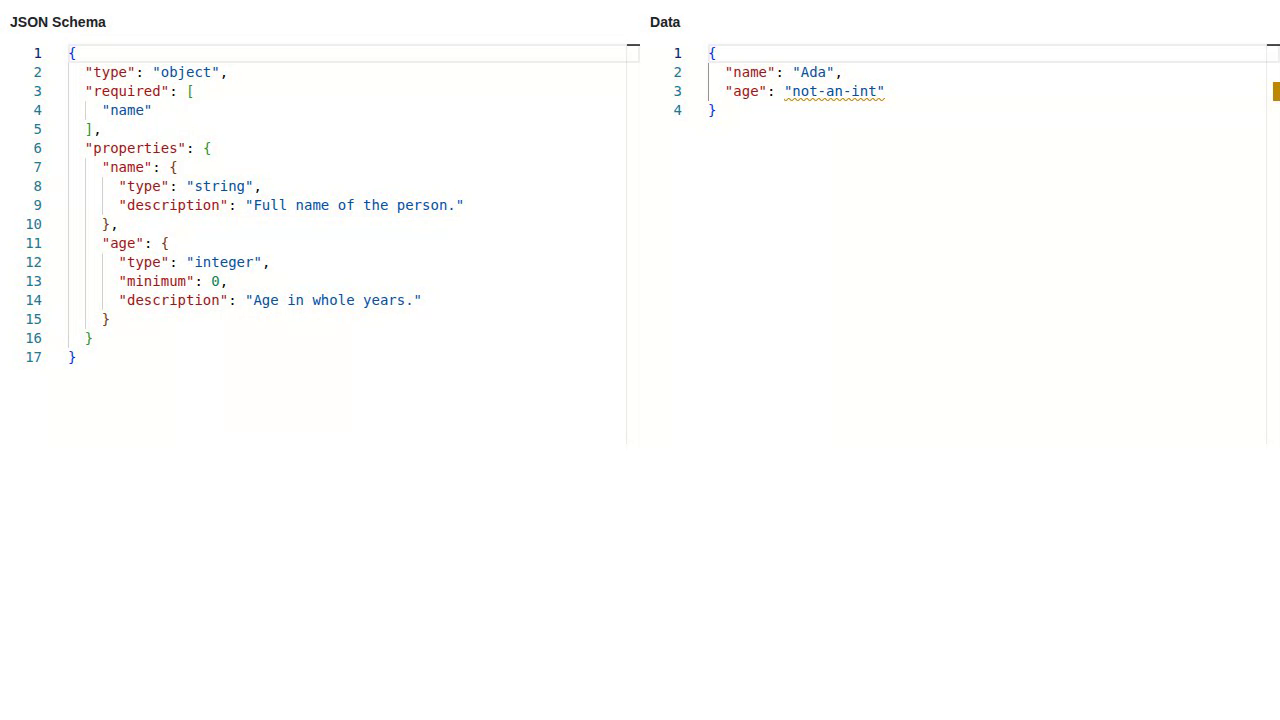
Source: examples/panels/monacoeditor/monacoeditor_panel_min.py
Test: tests/panels/monacoeditor/examples/test_monacoeditor_panel_min.py
Two MonacoEditor panels used directly in a Panel layout. The left one holds a JSON Schema and is free to edit; the right one holds a data document validated against that schema, live.
The code
SCHEMA is a tiny JSON Schema and DATA a matching document, both defined at module level. The app is one Viewer: two editors, plus a param.watch that re-applies the edited schema to the data editor on every change, so the markers under the data update as you type.
class App(pn.viewable.Viewer):
    def __init__(self, **params):
        super().__init__(**params)

        self.schema_editor = MonacoEditor(value=json.dumps(SCHEMA, indent=2))
        self.data_editor = MonacoEditor(value=json.dumps(DATA, indent=2), json_schema=SCHEMA)

        self.schema_editor.param.watch(self.on_schema_change, "value")

        self.status = pn.pane.Markdown("")

        self._view = pn.Column(
            pn.Row(
                pn.Column("### JSON Schema", self.schema_editor),
                pn.Column("### Data", self.data_editor),
                sizing_mode="stretch_width",
            ),
            self.status,
        )

    def on_schema_change(self, event):
        try:
            self.data_editor.json_schema = json.loads(event.new)
        except json.JSONDecodeError as exc:
            self.status.object = f"Schema is not valid JSON: {exc}"
        else:
            self.status.object = "Schema applied."

    def __panel__(self):
        return self._view
Validation is entirely local: Monaco resolves json_schema in the browser and never fetches anything over the network.
What you’ll see
        graph LR
    schema(["JSON Schema<br/>left, editable"])
    data(["Data document<br/>right, validated"])
    schema -- "json_schema, live" --> data

    classDef ed fill:#0d7377,stroke:#095c5f,color:#ffffff
    class schema,data ed
Two editors side by side. In the capture the data sets age to an invalid value, so the right editor draws a warning squiggle under it with the schema’s own description in the hover.
Run it live
This example runs entirely in your browser via Pyodide. The first load downloads packages, so give it a few seconds.