Device hierarchy ontology
Source: examples/panels/visnetwork/device_hierarchy.py
Test: tests/panels/visnetwork/examples/test_device_hierarchy.py
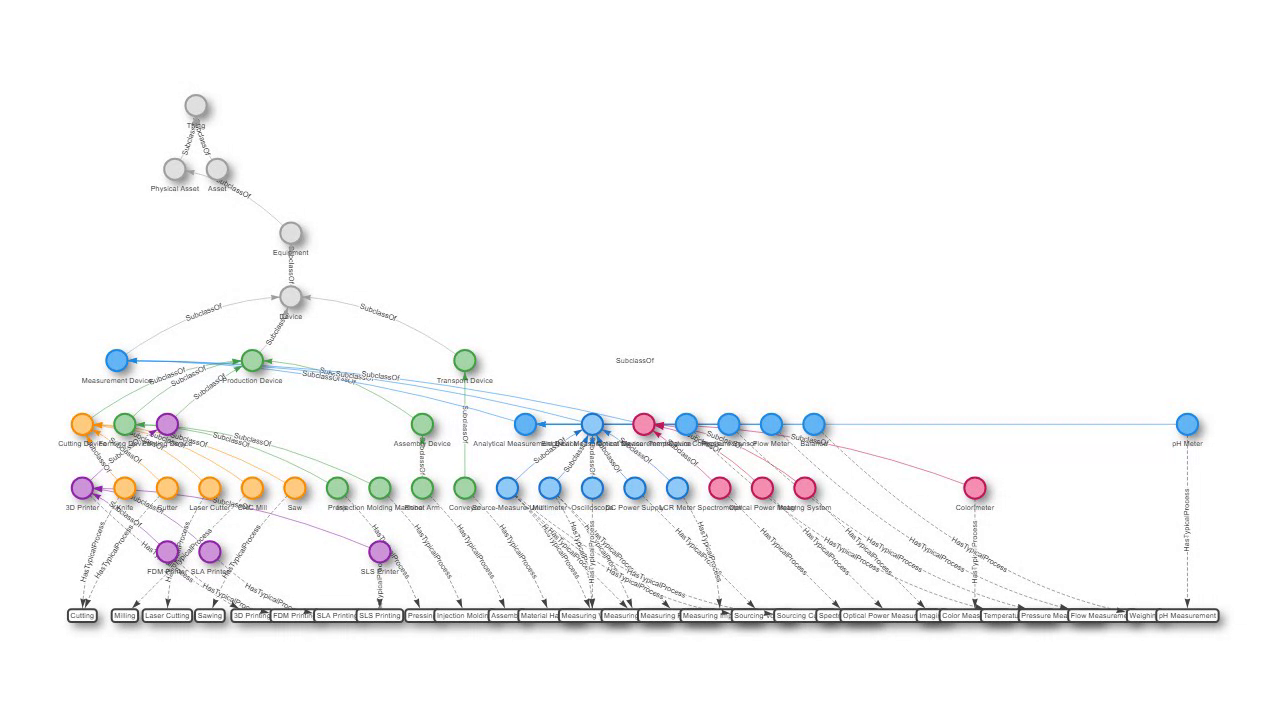
A device ontology drawn as a top-down hierarchical layout. Device classes descend from Thing through Device to concrete instruments, linked by solid SubclassOf edges, while dashed HasTypicalProcess edges connect each device to the operations it performs.
Physics is turned off and the layout is computed by vis-network’s hierarchical engine, so the tree stays stable. Node groups are colour-coded by domain (measurement, production, cutting, printing, electrical, optical) and process nodes render as plain boxes.
The code
import panel as pn

from panelini.panels.visnetwork import VisNetwork

# device_nodes carry a "group" and a "level"; process_nodes are shape "box".
# (long node lists elided - see the source file)
nodes = device_nodes + process_nodes

# Solid SubclassOf edges plus dashed HasTypicalProcess edges.
edges = edges_subclass + edges_process

options = {
    "groups": {
        "device_root": {"color": {"background": "#e0e0e0", "border": "#9e9e9e"}},
        "device_measurement": {"color": {"background": "#64b5f6", "border": "#1e88e5"}},
        "device_production": {"color": {"background": "#a5d6a7", "border": "#43a047"}},
        # ... more group colours ...
        "process": {"color": {"background": "#ffffff", "border": "#424242"}},
    },
    "layout": {
        "hierarchical": {
            "enabled": True,
            "direction": "UD",
            "sortMethod": "directed",
            "levelSeparation": 120,
            "nodeSpacing": 80,
            "treeSpacing": 150,
        }
    },
    "physics": {"enabled": False},
    "interaction": {"hover": True, "navigationButtons": True, "keyboard": True},
}

visnetwork_panel = VisNetwork(nodes=nodes, edges=edges, options=options)
pn.serve(visnetwork_panel, threaded=True)
Run it live
This example runs entirely in your browser via Pyodide. The first load downloads packages, so give it a few seconds.