Filesystem browser - lazy loading from a real backend
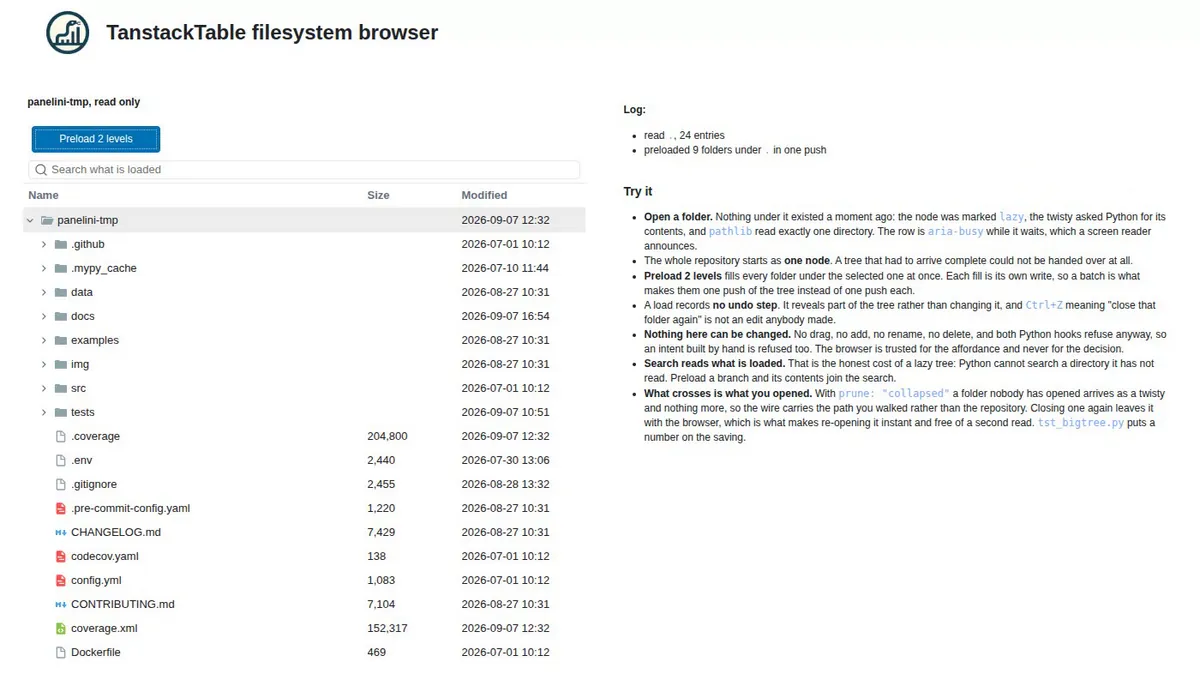
Note
Shown as a screenshot rather than a live in-browser demo. This example walks the real repository directory tree with pathlib, and there is no repository in the Pyodide WASM filesystem, so it is excluded from the browser portfolio. Run it locally to try it. For a tree large enough to need the same machinery, without a disk behind it, see Big tree - one node to a million, and what each size costs.
Source: examples/panels/tanstack/table/tst_fsbrowser.py
Test: tests/panels/tanstack/table/examples/test_tst_fsbrowser.py
A tree that does not exist until you look at it. The whole repository is handed over as a single node, lazy_callback reads one directory per twisty, and nothing is ever written back. This is the panel against a backend it does not own, which is what a database, an object store or a network share also looks like from here.
Features on display
Lazy loading: the whole repository starts as one node marked
lazy: True. Opening a twisty callslazy_callback,pathlibreads exactly one directory, and the row isaria-busywhile it waits.batch(): “Preload 2 levels” fills every folder under the selected one. Eachset_childrenis its own write; a batch makes them one push.A load records no undo step - it reveals part of the tree rather than changing it.
Read only, twice over:
enable_dndis off so the browser never offers the gesture, and both Python hooks refuse anyway, so an intent built by hand is refused too.prune: "collapsed": a folder nobody has opened crosses as a twisty and nothing more, so the wire carries the path you walked rather than the repository.A log naming every directory that was read, which is the whole conversation between the panel and the disk.
The wiring
def load_children(key: str, node: dict[str, Any]) -> list[dict[str, Any]]:
    """Answer the browser asking for a folder's contents."""
    loaded = read_dir(key)
    say(f"read `{key}`, {len(loaded)} entries")
    return loaded


def refuse(*_args: Any) -> bool:
    """Refuse every change, which is what read only means here."""
    return False


browser = TanstackTable(
    # One root, lazy. A hundred bytes of tree for a repository of any size.
    source=[
        {
            "key": ROOT_KEY,
            "title": ROOT.name,
            "type": "folder",
            "lazy": True,
            "size": "",
            "modified": stamp(ROOT),
        }
    ],
    columns=[
        {"id": "title", "header": "Name", "width": 320, "min_width": 180},
        {"id": "size", "header": "Size", "width": 110},
        {"id": "modified", "header": "Modified", "width": 150},
    ],
    types={"folder": FOLDER_TYPE, "file": FILE_TYPE},
    options={
        "aria_label": "Repository browser",
        "enable_dnd": False,
        "select_mode": "single",
        "show_checkboxes": False,
        "sort_folders_first": True,
        "prune": "collapsed",
        "toolbar": ["search"],
        "search_label": "Search what is loaded",
    },
    lazy_callback=load_children,
    action_callback=refuse,
    move_callback=refuse,
    sizing_mode="stretch_both",
)
Key points:
The key is the path relative to the root, which is unique by construction and is also what the loader reads to know where to look. Nothing else about the filesystem crosses.
load_childrenreturns a list, which answers now. An application waiting on a network call would returnNoneand callset_childrenwhen the call comes back.The preload wraps its walk in
with browser.batch():, so a hundredset_childrencalls are one push of the tree.expand-allis deliberately absent from the toolbar: on a lazy tree it would mean “read the whole disk”.Search reads only what is loaded. That is the honest cost of a lazy tree - Python cannot search a directory it has not read.
How the test exercises it
Nothing here names a file, counts a directory or assumes a depth, because the example walks whatever repository it is run in. What is pinned down is the behaviour:
One lazy node: the root carries
lazy: Trueand nochildrenat all, asserted without a browser.One expand, one directory: after clicking the root twisty, every folder underneath is still a twisty and the log names exactly one read.
One push per preload: a
param.watchonsourcecounts a single event however many folders the preload reads.No undo step:
can_undois still false after a load.Pruning: a preload puts two levels into
sourceand only the level that is open is in what crosses; every folder below it goes over as a twisty.
See also
TanstackTable - the panel guide, including the large-tree notes
Big tree - one node to a million, and what each size costs - the same machinery on a tree of up to a million nodes
VFS explorer - two panes and external file drop - the same panel with every gesture turned on
Treegrid - columns and cell editors - columns and cell editors