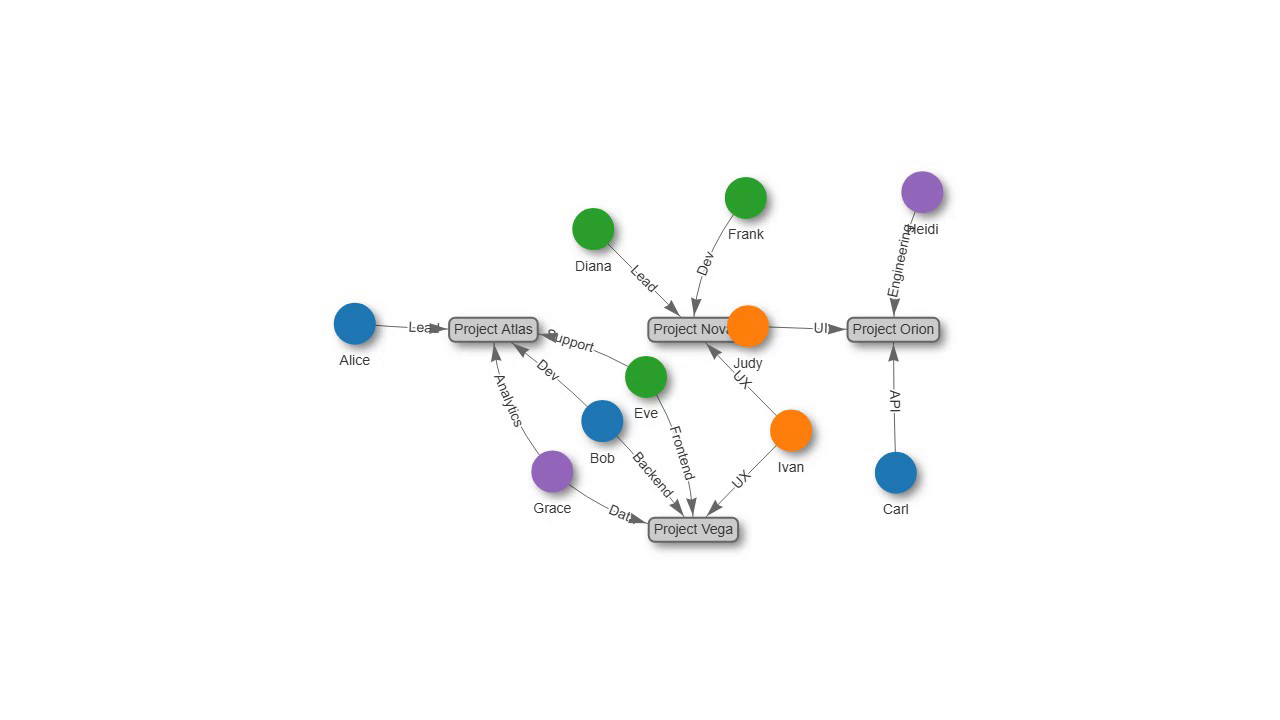
Team and project structure with colored groups
Source: examples/panels/visnetwork/group_filtering.py
Test: tests/panels/visnetwork/examples/test_group_filtering.py
Four projects and ten people, laid out as a small org chart. The project boxes sit at fixed coordinates so they stay put, while the people nodes are placed by the physics engine and colored by the team they belong to.
Each node carries a group key. The groups block in options maps every group name to a background and border color, so backend, frontend, data, and design members are told apart at a glance without per-node styling.
The code
import panel as pn

from panelini.panels.visnetwork import VisNetwork

# Project nodes (fixed positions, no physics)
project_nodes = [
    {"id": "P1", "label": "Project Atlas", "group": "project", "shape": "box",
     "x": -200, "y": -50, "fixed": True, "physics": False},
    # ...
]

# People nodes (groups by role/team)
people_nodes = [
    {"id": "B1", "label": "Alice", "group": "backend", "title": "Backend Lead"},
    {"id": "F1", "label": "Diana", "group": "frontend", "title": "Frontend Lead"},
    {"id": "D1", "label": "Grace", "group": "data", "title": "Data Scientist"},
    {"id": "DS1", "label": "Ivan", "group": "design", "title": "UX Designer"},
    # ...
]

nodes = project_nodes + people_nodes

# Edges: People -> Projects
edges = [
    {"from": "B1", "to": "P1", "label": "Lead", "arrows": "to"},
    # ...
]

# vis.js options for group colors and physics
options = {
    "groups": {
        "project": {"color": {"background": "#cccccc", "border": "#666666"}},
        "backend": {"color": {"background": "#1f77b4", "border": "#1f77b4"}},
        "frontend": {"color": {"background": "#2ca02c", "border": "#2ca02c"}},
        "data": {"color": {"background": "#9467bd", "border": "#9467bd"}},
        "design": {"color": {"background": "#ff7f0e", "border": "#ff7f0e"}},
    },
    "physics": {
        "enabled": True,
        "stabilization": {"enabled": True, "iterations": 200},
    },
    "interaction": {"hover": True},
}

visnetwork_panel = VisNetwork(nodes=nodes, edges=edges, options=options)
Because physics stabilization is enabled, the free people nodes settle around the fixed project boxes over the first few seconds. The still above is captured after the layout has stabilized.
Run it live
This example runs entirely in your browser via Pyodide. The first load downloads packages, so give it a few seconds.